Skip to content
Open source · v2.0.0

Replay the mainframe at any scale

3270Connect turns a recorded 3270 session into a repeatable workflow: one JSON file, run headless in CI, fanned out across hundreds of concurrent workers, with every step landing on a live operations console and a Prometheus endpoint.

session · load run 25 workers
$ 3270Connect -config workflow.json \
    -concurrent 25 -runtime 60 -headless
 connect  mvs.example.com:992    [ok]
 workers  25 spawned               [live]
 steps    FillString · PressEnter  [ok]
 metrics  :9090/metrics scraped    [up]
 
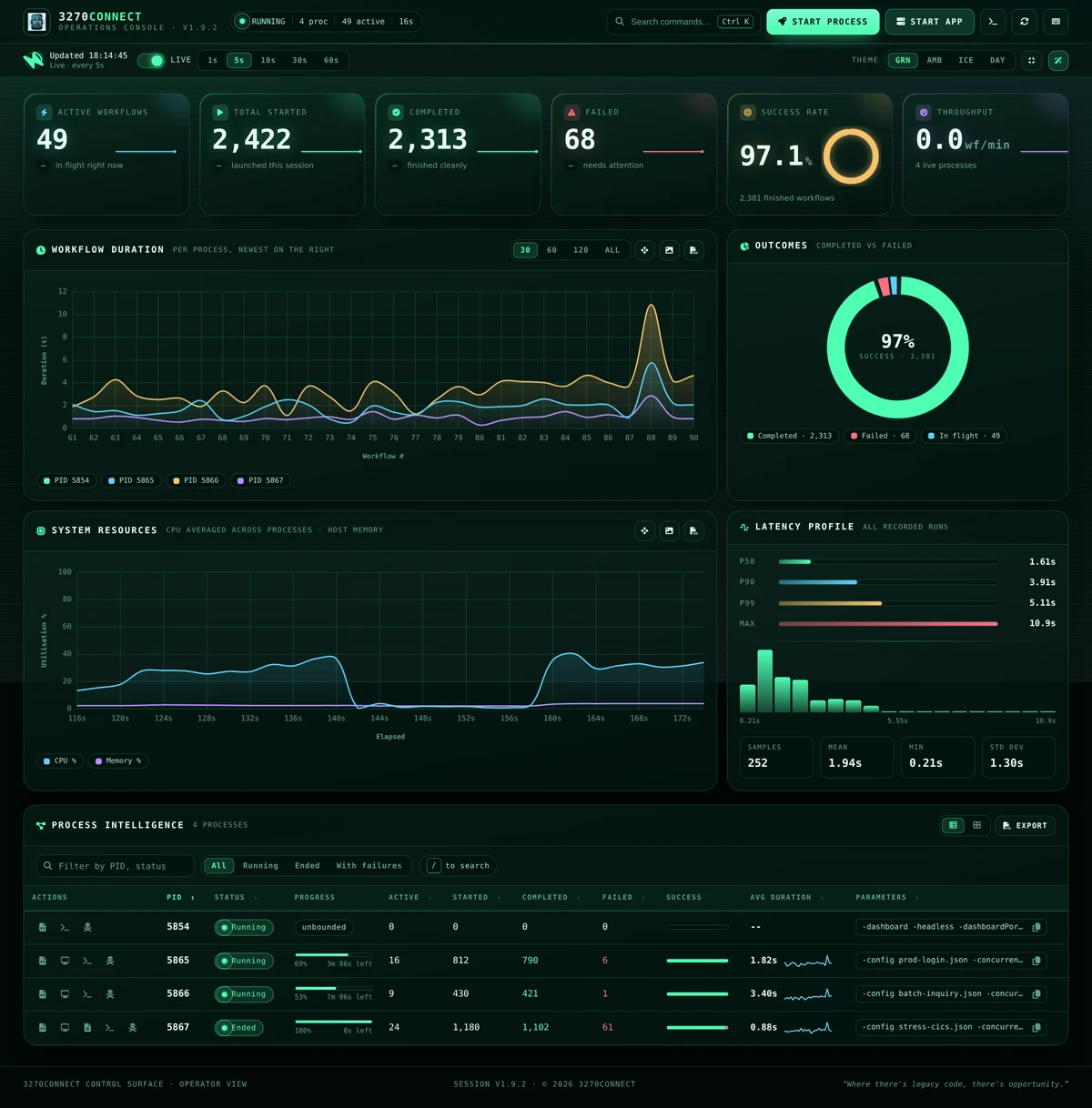
Success rate97.1%2,381 finished workflows
p95 step0.34smeasured host-side
Completed2,313this session
Dependencies0single static binary

See it work

The operations console: launching an eight-worker load run from the browser, then watching the process table, the live screen flow and the charts fill in.

Shorter walk-throughs of one thing at a time:

Video Where
Your first workflow — describe a session in JSON and replay it Basic Usage
Run it at scale — -concurrent and -runtime Basic Usage
Call it over HTTP — one POST returns the screen Advanced Features
The operations console, end to end Web Dashboard
Sign-in and administration with AUTH_MODE=local Accounts and Sign-In
Profile a host before you trust a workflow against it Host Compatibility Profiler
Drive it from an AI client over MCP MCP Server

What it does

  • Workflows as JSON


    Describe a session once — connect, fill, press, assert, grab the screen, disconnect — and run it anywhere. No scripting language to learn, no emulator to install.

    Workflow actions

  • Concurrency & load testing


    Run the same workflow across hundreds of parallel workers for a fixed duration, with per-workflow timeouts, grace periods and a controlled shutdown.

    Basic usage

  • Live operations console


    Watch runs as they happen: latency percentiles, outcomes, per-process controls and streaming logs — served straight from the binary, no external services.

    Web dashboard

  • Accounts when you need them


    One operator needs no sign-in and gets none. Share the port and AUTH_MODE=local adds accounts, groups, per-account API tokens, single sign-on and an audit trail of who aimed what at which host.

    Accounts and sign-in

  • Prometheus metrics


    Scrape tn3270_connect_seconds, tn3270_step_seconds, workflow outcomes and live worker counts from -promListen and put mainframe runs on the same board as everything else.

    Metrics & monitoring

  • AI Chat mode


    Drive a live session from 3270Web by typing plain English. The model reads the screen, proposes field fills and key presses, and waits for your approval before acting.

    AI Chat mode

  • Host compatibility profiler


    Probe a host once with -profile and write a CompatibilityProfile JSON document that diffs cleanly against 3270Web output across environments.

    Host profiler

The operations console

The 3270Connect operations console

The web dashboard — live workflow metrics, latency percentiles, per-process controls and log streaming, served straight from the binary.

Introduction

3270Connect is a robust automation toolkit that pairs a powerful command-line utility with 3270Web, a browser-based web console for enhancing productivity and efficiency in managing and automating interactions with mainframe 3270 applications. It acts as a bridge between modern computing environments and the traditional mainframe terminals, providing a suite of tools that facilitate automated tasks and workflows in a terminal session.

The utility is used by system administrators, developers, and testers who frequently interact with mainframe systems, which are still pivotal in various industries such as banking, insurance, and government services. With 3270Connect, users can script complex sequences of tasks, automate data entry, perform complex online operations, and capture terminal screens for logging or debugging purposes.

One of the main reasons for using 3270Connect is its ability to save time on repetitive tasks by automating them. This can be especially beneficial in testing scenarios where the same set of operations needs to be performed repeatedly. Moreover, the utility provides a way to integrate mainframe operations with modern CI/CD pipelines, thereby modernizing the development and deployment workflows that involve mainframe systems.

With 3270Connect, users can:

  • Define and execute automated workflows through a configuration file, enhancing repeatability and reliability in interactions with terminal screens.
  • Capture the state of the 3270 terminal screens at any point during a workflow, which is invaluable for documentation and troubleshooting.
  • Execute multiple workflows in parallel, optimizing time and resources, especially in complex test environments.
  • Operate in a headless mode, allowing the automation to run in the background or in environments without a graphical interface, such as servers or continuous integration systems.
  • Utilize a verbose output mode for an in-depth understanding of workflow execution, which assists in monitoring and debugging.
  • Surface failure-only logging with -verboseFailures to capture concise diagnostics during high-volume runs without enabling full verbose output.
  • Run 3270Connect as an API server, enabling advanced automation scenarios and facilitating load and performance testing of mainframe applications.
  • Drive a live 3270 session from 3270Web with AI Chat mode, which reads the screen, proposes actions, and can orchestrate chaos exploration with explicit approval.

Through these features, 3270Connect empowers organizations to integrate their legacy systems into modern automated processes, reducing errors, and increasing efficiency.

Features

Here are the key features of 3270Connect:

  • Running workflows defined in a configuration file.
  • Command-line interface for scripting and running automation from the terminal.
  • Capturing the 3270 screens as the workflow executes.
  • Running workflows concurrently with options for controlling the number of concurrent workflows and runtime duration.
  • Web dashboard for live metrics, latency percentiles, log streaming and per-process control — self-contained, with no external dependencies at runtime.
  • 3270Web to open AI Chat mode for conversational session control.
  • Headless mode for running workflows without a graphical user interface.
  • Verbose mode for detailed output, plus failure-only logging with -verboseFailures for high-concurrency test runs.
  • API mode for advanced automation.
  • AI Chat mode in 3270Web for screen reading, field entry, key presses, and chaos exploration with per-action approval or Auto Mode.
  • Prometheus metrics endpoint (-promListen) exposing connect/step timing, workflow outcomes, and live concurrency for fleet-scale monitoring.
  • One-shot host compatibility profiler (-profile) that produces a CompatibilityProfile JSON document shareable with 3270Web for cross-environment comparison.
  • Running a 3270 sample application to assist with testing workflow features.

Getting Started

If you're new to 3270Connect, you can start by exploring the following sections:

  • Installation: Learn how to install 3270Connect on your system.
  • Basic Usage: Get started with basic usage, running workflows and sample 3270 application(s) to aid testing.
  • Web Dashboard: Watch runs live, launch them from the browser, and stream logs from the operations console.
  • Workflow Steps: Overview of the various workflow steps available in the 3270Connect application

Advanced Features

Once you've mastered the basics, you can dive into more advanced features:

  • API Mode: Discover how to run 3270Connect as an API server for advanced automation and load performance testing.
  • Accounts and Sign-In: Put a sign-in on the console with AUTH_MODE=local, issue per-account API tokens, and connect an OIDC identity provider.
  • Administration: Manage accounts, groups and tokens from the browser, see every load run on the machine, and read the audit trail.
  • AI Chat Mode: Use 3270Web to drive a live 3270 session through conversation, approve tool calls, and run chaos exploration.
  • Chaos Mode: Learn how toolbar controls and AI Chat share the same exploration state and export workflows.
  • Metrics & Monitoring: Scrape tn3270_connect_seconds, tn3270_step_seconds, workflow outcomes, and live worker counts from -promListen.
  • Host Compatibility Profiler: Probe a host once with -profile and write a CompatibilityProfile JSON document that compares cleanly against 3270Web output.
  • Compatibility Profile Schema: Field-by-field reference for the shared CompatibilityProfile document (v1.0.0).

Conclusion

The 3270Connect command-line utility is a powerful tool for automating terminal emulator interactions. This documentation is here to help you make the most of it. If you have any questions or need assistance, feel free to reach out to the community or refer to the GitHub repository for more details.

Let's get started with 3270Connect!